Classroom Q&A

Stop raising your hand into silence.

ClassQ turns every lecture — in-person, online, or hybrid — into a conversation. Students ask without raising a hand, AI groups similar questions, and instructors answer the ones that matter most.

Free for students.

ClassQ student view — a live session with AI-clustered questions and upvotes

Most lectures end in silence.

A handful of brave students ask questions. The silent majority meant to, but didn't. Instructors don't see what the class is actually confused about — and online and hybrid classes make it worse: cameras off, mics muted, chat scrolling past too fast to follow.

1

Students ask, anonymously

No unmuting, no spotlight. Type it or say it — voice questions are transcribed automatically. Classmates see the question, not the name.

2

AI groups the duplicates

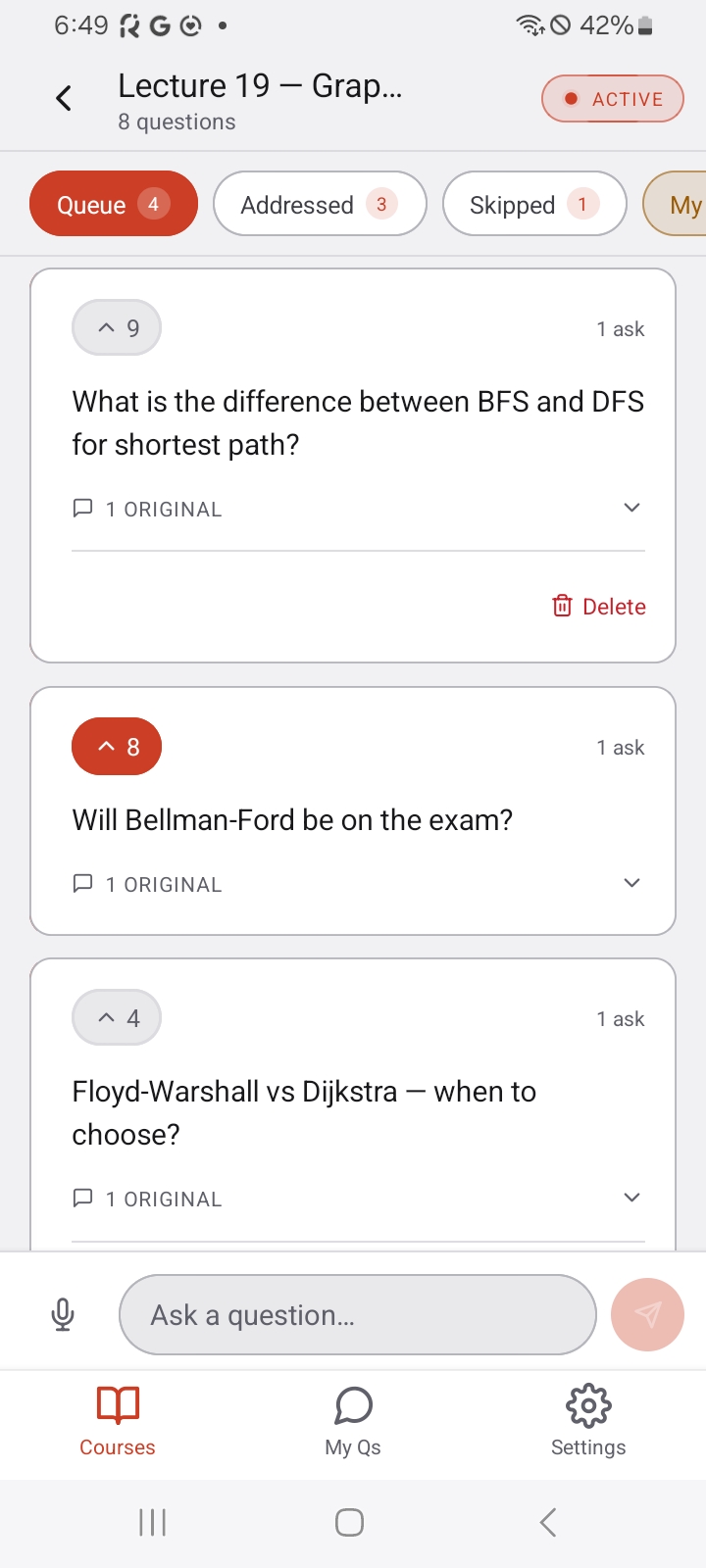
Thirty variations of the same question become one clear thread. Upvotes push what the room actually wants answered to the top.

3

Instructors answer what matters

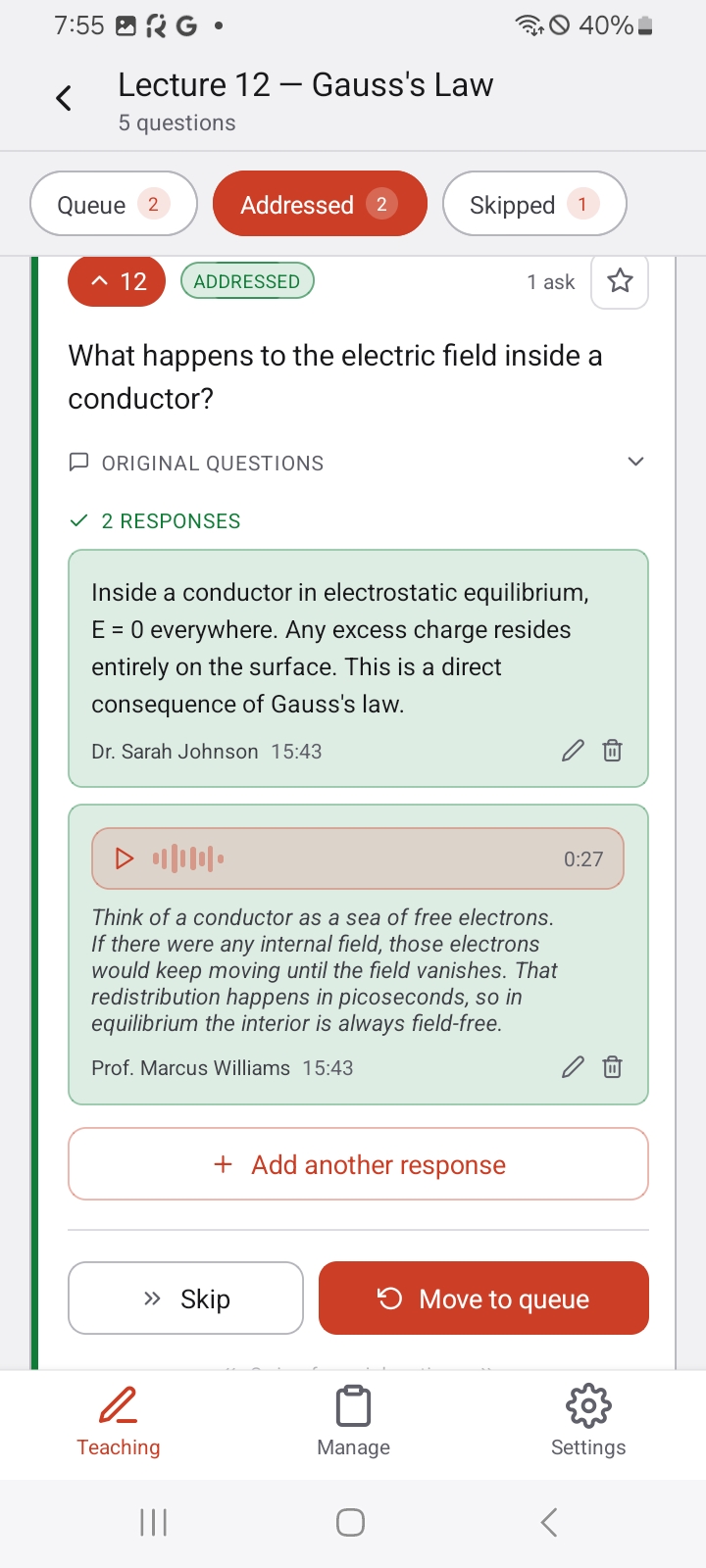
One queue, sorted by traction. Reply by voice, text, or a link — live during the lecture or after class. Everyone sees the answer.

Built for how classes actually work.

A 12-person seminar or a 400-person intro. Zoom rooms, lecture halls, office hours, labs. Light enough that there's nothing to learn.

🙋

Anonymous asking

Students ask without outing themselves. Instructors see names, classmates don't.

🧠

AI question clustering

Similar questions merge automatically into one representative thread with a vote count.

🎙️

Voice in, voice out

Record a question or an answer — ClassQ transcribes both automatically.

📌

Live queue triage

Swipe to mark addressed or skip. Pin the critical question so it stays on top.

🛡️

Built-in moderation

AI screens submissions for abuse before they post; instructors can hide anything that slips through.

🕘

Nothing gets lost

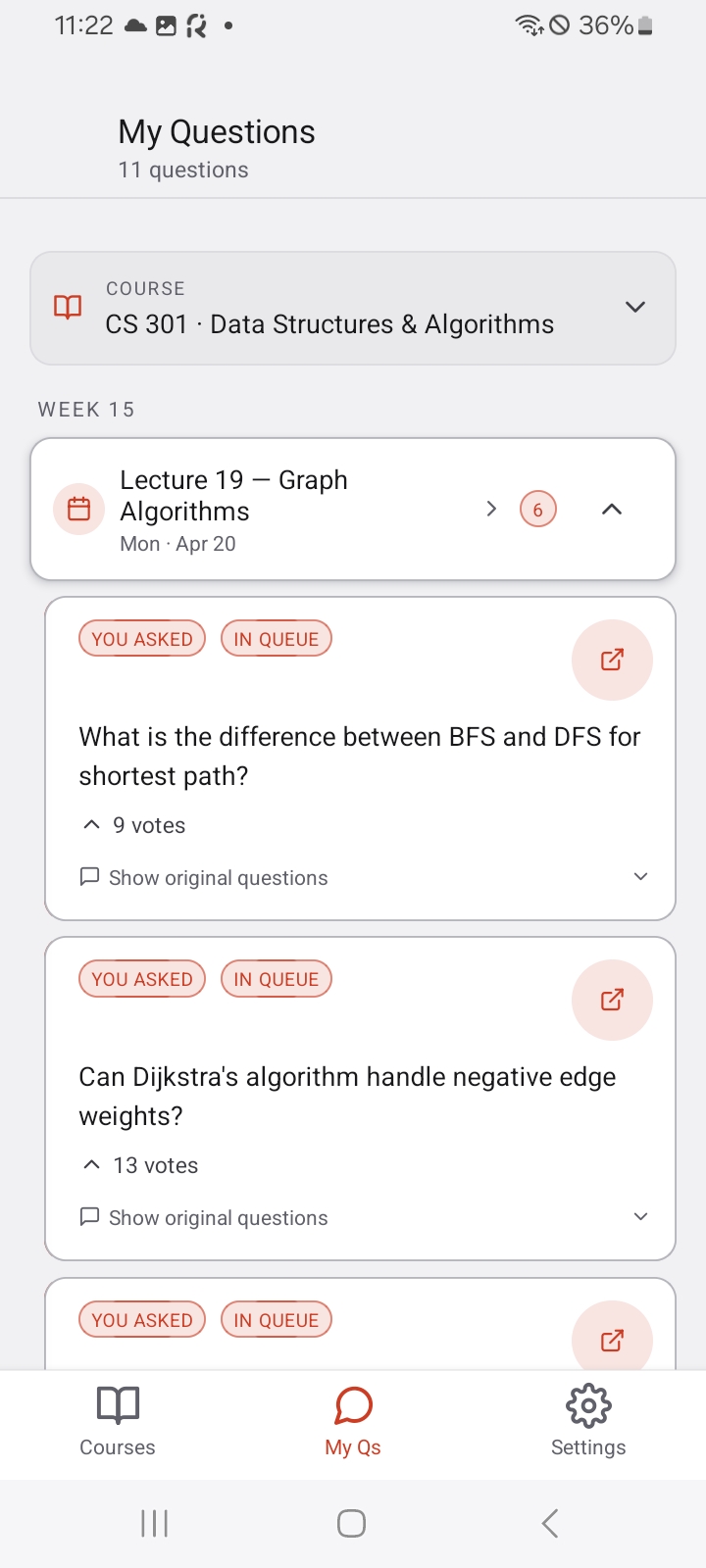
Every question and answer is kept per session — students revisit them any time, with transcripts.

One app, both sides of the room.

Student view — live Q&A with clustered questions
Students — ask, upvote, follow the queue
Instructor view — question queue with a pinned card and audio response
Instructors — triage by votes, answer by voice
Student view — My Questions history
History — every answer, ready to revisit

One product, three wins.

For students

Your questions deserve an answer.

  • Ask without unmuting or raising a hand.
  • See what classmates are actually confused about.
  • Revisit every answered question from any past lecture.
  • Free.

For instructors & TAs

See what 200 students are confused about — in 30 seconds.

  • One clustered queue replaces a chaotic scrolling chat.
  • Reply by voice (auto-transcribed), text, or a link.
  • Pin critical questions, mark others addressed, keep moving.

For departments

Real-time signal on teaching effectiveness.

  • Consistent experience across in-person, online, and hybrid sections.
  • Volume pricing and custom limits.
  • Priority support.

Simple pricing. Free for students.

Instructors pick a plan for the courses they run. Students and TAs join free with a course code.

Student

$0

no subscription needed

  • Join unlimited courses with a code
  • Ask & upvote in live sessions
  • Voice questions with transcription
  • Full question & answer history
Get the app
Most popular

Standard

$9.99 / month

or $89.99/year — save 25%

  • Up to 5 courses
  • 100 students per course
  • Unlimited sessions
  • AI question clustering
  • Audio responses + AI transcription
  • Pin priority questions
Start with Standard

Pro

$19.99 / month

or $189.99/year — save 21%

  • Up to 15 courses
  • 500 students per course
  • Unlimited sessions
  • AI question clustering
  • Audio responses + AI transcription
  • Pin priority questions
Go Pro

Custom / Enterprise — departments and universities: custom limits, volume pricing, priority support.

Contact sales →

Questions, answered.

Do students have to pay?

No — students join free with a course code from their instructor. Only instructors subscribe, for the courses they run.

Does it work for online and hybrid classes?

Yes. ClassQ is independent of your video platform — it works alongside Zoom, Teams, or a physical lecture hall. Any setup where someone is taking questions.

Are questions really anonymous?

Questions are anonymous to other students. Instructors can see who asked, which keeps the room accountable without the social cost of raising a hand.

What stops inappropriate questions?

Every submission is screened by AI before it posts — harassment, hate, and spam are rejected on the spot. Instructors can also hide anything that slips through, and restore it if they change their mind.

Can I cancel anytime?

Yes. Subscriptions are billed through the App Store or Google Play and can be cancelled there anytime — you keep access until the end of the billing period.
Bring every voice into the lecture.

ClassQ is launching on iOS and Android. Be first in the room.